
What Is an API? A Simple Explanation for Finance Professionals
What is an API? It is the connection that lets one software fetch or send data to another automatically, like a pipe between two systems, so nobody re-types it.
Picture this. Your sales team takes orders on one app. Your accounts team works in SAP or Tally. Every evening, somebody sits down and punches those same orders again into the accounting software. Time waste, first of all. Then errors. So what is an API, and why does every finance person need to understand it today? An API is simply the connection that lets one software talk to another software automatically, so that nobody has to re-type anything. Let me show you how it works, in plain language, with examples from our own world of accounts.
What is an API? Explained in simple terms
When I teach this, I start with a small story. People live on top of a mountain and the river flows far below. Every day they walk down, fill water, and climb back up. Very hard work, and they still get very little water. That is a manual process.
Then someone used his brain. He put a motor at the river, dropped a pipe into the water and brought the pipe up the mountain. Now nobody needs to go down. The water comes up on its own. The process is automated.
How? Because of the motor. The motor is an integration between the resource and the need. Software works the same way: one system has the data, another needs it, and the connection between them is an integration. When one software is connected to another in real time, the technology that does it is called an API.
The full form is Application Programming Interface. Don't worry about the full form. Just remember: an API is the motor and pipe between two systems.
Why API integration matters in finance
When you pay online, does every website build its own payment system? No. It uses a payment gateway, like Razorpay, for a small fee, generally around 2% or less. Say you sell desi ghee on your website. The customer pays on the gateway, the confirmation comes back, the invoice gets posted to SAP or Tally, and the PDF goes to the customer on WhatsApp. Four different systems, zero re-typing. That is integration, and the method is API.
A real FMCG case from my consulting: the main software is SAP, but a licence can cost around Rs 80,000 to Rs 1 lakh per user. For 100 salespeople, that is about Rs 1 crore. So the sales team gets a cheaper Distributor Management System (DMS), at maybe Rs 300 to 500 per person. Orders are taken in DMS but processed in SAP, so the two must be integrated.
Some companies run a scheduler: every hour, DMS collects the orders, say 20 of them, and pushes them to SAP in one go. Others connect in real time through an API. The same idea sits behind a bank statement flowing into your accounting software or ERP data landing in an Excel report, where your bank or software supports it.
How a request and response works
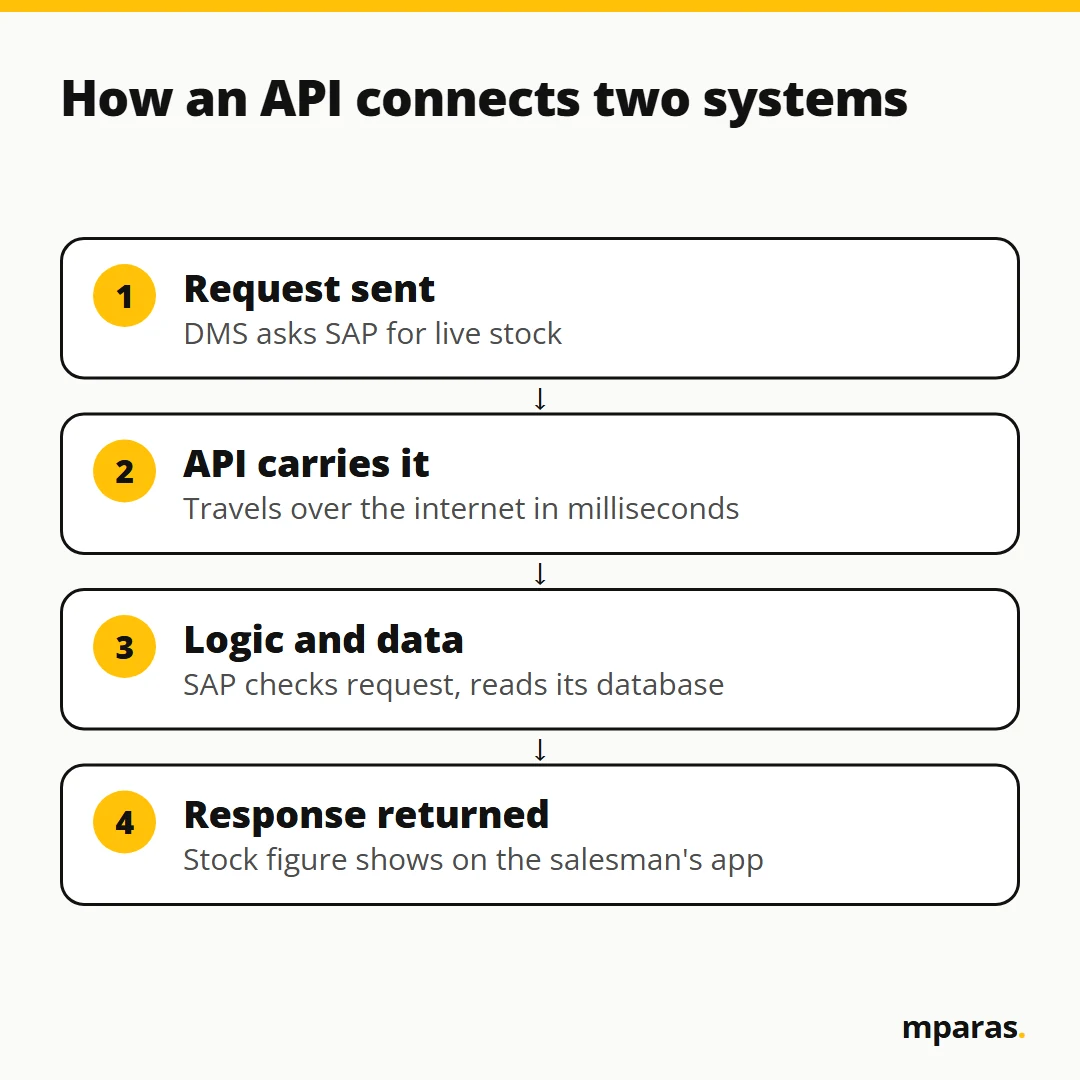
I explain this with a restaurant. You sit at the table and place an order: "I need dal makhani." That is your request. It goes to the kitchen, the back end. The kitchen applies its logic, takes the masalas and stock from the store (the database), prepares the dish and sends it back to you. That is the response.
An API call is the same: request goes, logic and data work, response comes back. All in milliseconds, even if the server sits in the US and you are in India.
GET and POST request: the four API methods
When two systems talk, they can do only four things: fetch, send, update or remove.
| Method | What it means | Finance example |
|---|---|---|
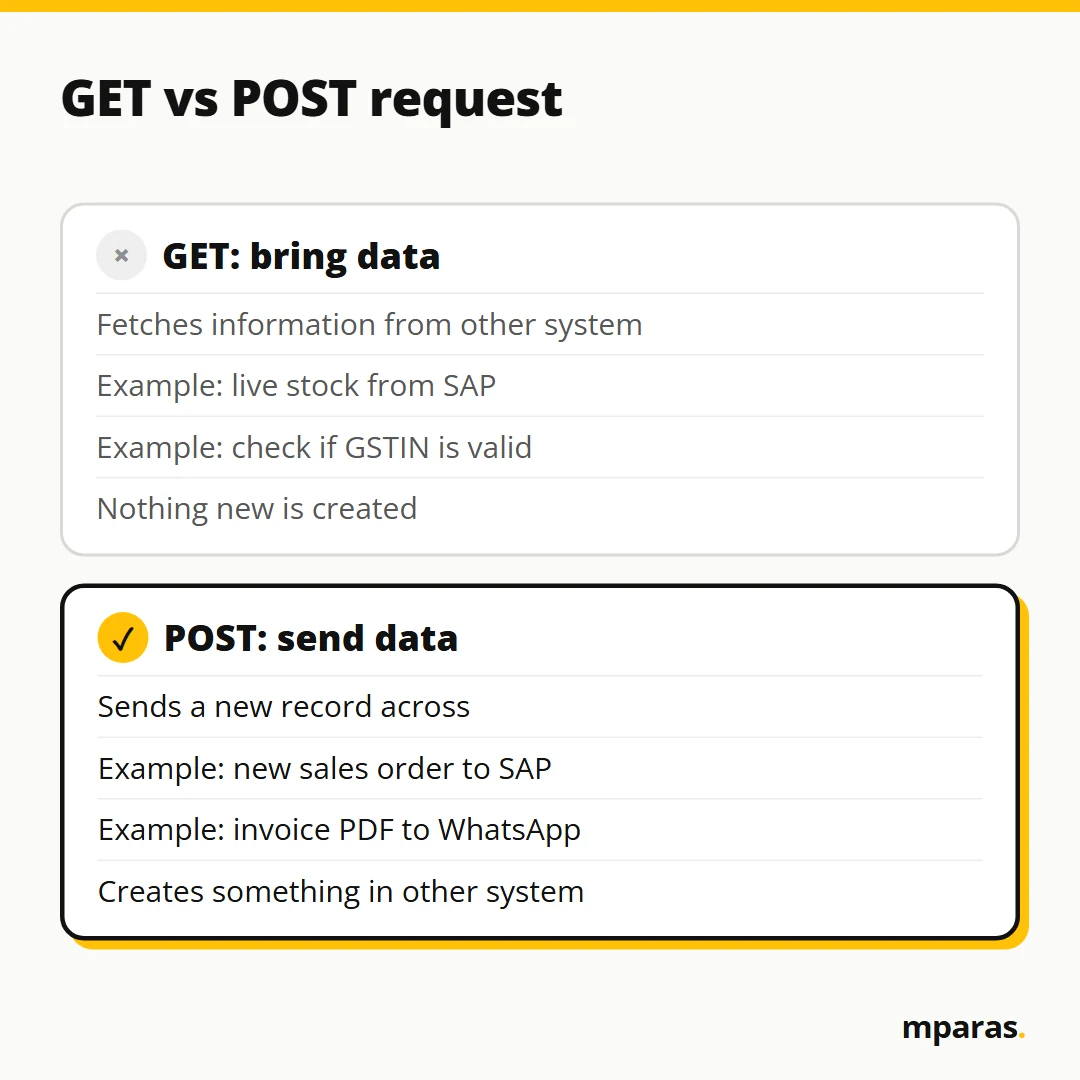
GET | Bring information from the other system | DMS pulls live stock from SAP |
POST | Send a new record to the other system | DMS sends a new sales order to SAP |
PUT | Update a record that already exists | Add two forgotten line items to the same order |
DELETE | Remove a record | Rarely used; we mark records inactive instead |
GET. Your salesman is at a shop and needs to know the stock. Without integration he calls the office, and the person there is at lunch. Now imagine 200 salesmen calling at once. Not possible, right? With a GET, he clicks once in his app and sees real stock.
GET also helps in data validation. While creating a customer, a "Check" button next to the GSTIN can ask a verification service whether the number is valid. The answer comes back as true or false.
POST. Based on that stock, the salesman books the order. The order must go to SAP for processing. That is a POST: you are sending something new.
PUT. Then he remembers he forgot two items. He edits the order in DMS and pushes it again. Because the order number is the same, SAP updates that order instead of creating a new one.
DELETE. Possible, but in the real world we generally mark records inactive. Deleting is dangerous: one wrong click and data you needed is gone.
JSON explained: the language APIs speak
In the old days, when there were no phones, people wrote letters. In which language? The one the receiver understands. If the receiver can't read it, the letter is useless. APIs also have a language that both sides understand. Generally it is JSON.
JSON looks like a dictionary. Every piece of data has a key (the label) and a value (the data). A simple customer record looks like this:
customer = {"code": "001", "name": "Paras"}
When there are many records, we put them in a list, inside square brackets:
students = [
  {"name": "Paras", "age": 34, "gender": "Male"},
  {"name": "Riya", "age": 32, "gender": "Female"}
]
Two things to notice. Text goes in inverted commas, numbers don't. And the computer counts positions from zero, not one. So students[0]["name"] gives Paras, and students[1]["age"] gives 32.
In class I deliberately typed gender with a small g when the key was Gender. The result? A key error. With a computer, you have to be 100% correct. You don't need to write this code yourself, but in your next integration meeting JSON should not look foreign to you.
Example: field mapping for API integration in finance
This is where an accountant is more useful than a coder. Two systems rarely use the same field names. One says "name", the other says "full name". Someone has to tell the system: this field goes there. That is field mapping. In the course activity we move a customer from an old software to a new one. Here is the logic (sample data is only an illustration):
- Customer code goes to Party code. No change needed.
- Legal name goes to Party name. No change.
- Phone has 12 digits, because 91 is included. The new system takes only 10. So we keep the last 10 digits:
=RIGHT(C2,10). - GSTIN goes as it is.
- State code is mandatory in the new system, but the old one has no such field. Think. The first two digits of a GSTIN are the state code. So
=LEFT(D2,2)gives it. - Registered on date: change the format to what the new system wants, for example
=TEXT(F2,"yyyy-mm-dd"). - Credit days are stored as text. The new system needs a number:
=VALUE(G2).
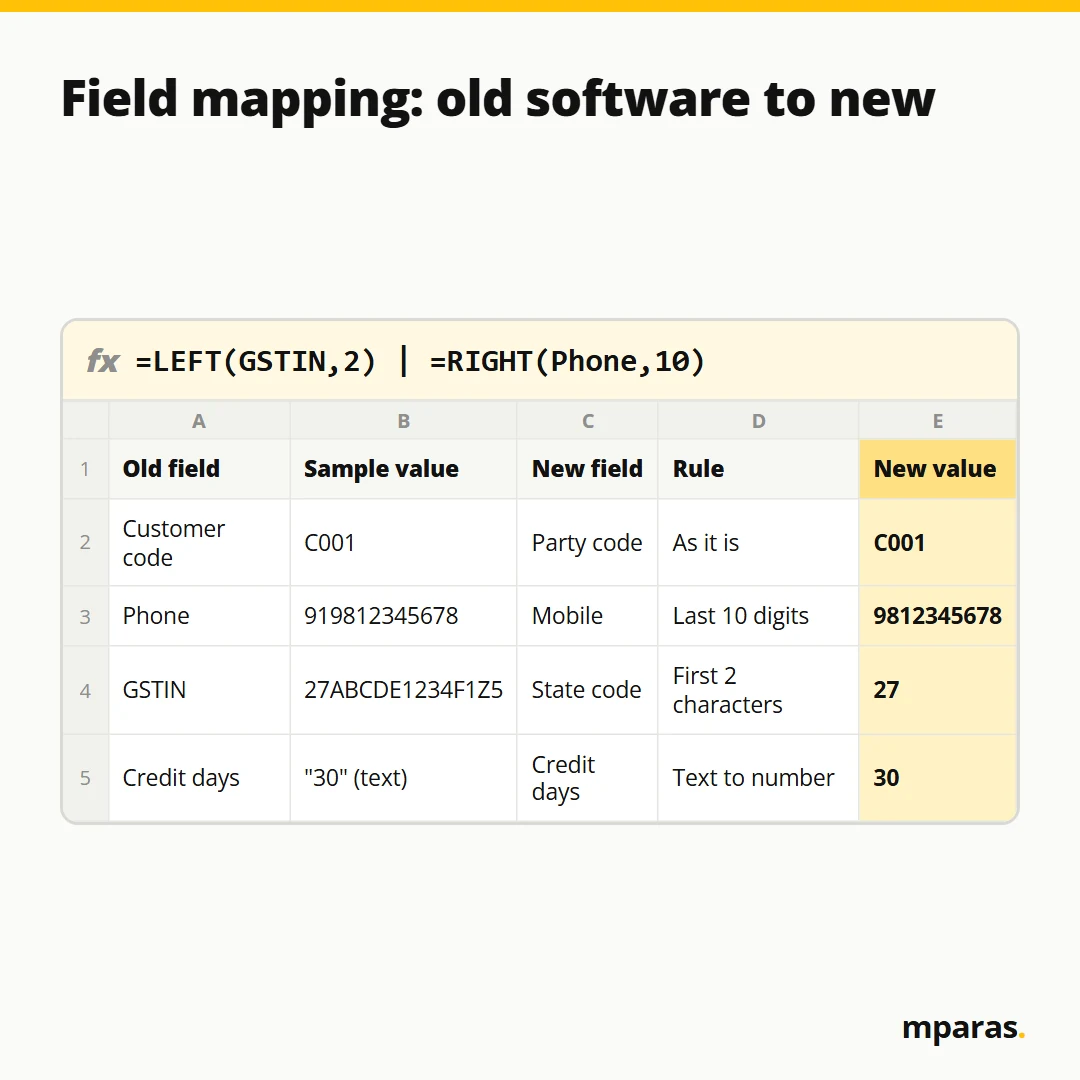
Once every field showed correct, we ran it, and the customer got created in the new software through the API. Did you need coding? No. Deciding which field goes where is the real work. Dimaag yahan lagana hai, not in the code. You are not an IT guy, but you are a technical guy.
Common mistakes in API integration
- Assuming field names match. Map every field and check the format: digits, dates, text versus number.
- Ignoring capital and small letters.
Genderandgenderare two different keys for the computer. - Testing once and going live. Send one record, check it, then test in different ways.
- Deleting instead of inactivating. Prefer inactive. Deleted data is hard to bring back.
- Leaving everything to the consultant. If you don't understand the flow, a developer or consultant can easily confuse you. When you know your things, no one can fool you.
FAQs
What is an API in simple words?
An API is a connection that lets one software ask another software for data, or send data to it, automatically. Think of it as the motor and pipe that bring water up the mountain, so nobody has to carry it by hand.
What is the difference between a GET and POST request?
A GET request brings information from the other system, like checking live stock. A POST request sends new information to the other system, like a new sales order going into SAP.
Do accountants need to learn coding to work with APIs?
No. AI tools and the IT team can write the code. What you need is the logic: which data moves, which field goes where, and how to test that it came across correctly.
What is JSON and why do APIs use it?
JSON is a simple format of keys and values, like {"code": "001", "name": "Paras"}. Both systems understand it, the way a letter must be written in a language the receiver can read.
What is field mapping in an integration?
Field mapping means telling the system which field in the old software goes into which field in the new one, and how to convert it. For example, dropping 91 from a phone number or taking the state code from the first two digits of a GSTIN.
Related reading: Convert Invoice PDF to Excel with AI (Without Typing) and ChatGPT for Accountants: How It Works and How to Use It Safely.
Where to start
If your team is still re-typing data from one system into another, the problem is not your people. It is the missing connection. A good first step is to check where you stand with AI and automation today: take the free 2-minute AI test. Simple si baat hai: understand the logic first, the tools come after.
When you want the full picture, how systems, data, the internet and APIs fit together, with the hands-on field mapping activity, that is what we cover in the AI in Finance course.
Stop doing finance work by hand.
Build your own AI tools for collections, invoices and reports. No coding. In Hinglish, taught by a CA.
- 27 chapters, 15+ real tools
- Lifetime access, GST invoice
₹2,499 GST included
Buy the course See what's inside or take the free 2-minute AI test
Comments
No comments yet. Ask a question or share how you'd use this.