
Convert Invoice PDF to Excel with AI (Without Typing)
To convert invoice PDF to Excel, ask AI to build a small invoice reader, test it on dummy invoices, then check that totals tie, GST matches the rate and every GSTIN has 15 characters.
If you want to convert invoice PDF to Excel without typing every line, you don't need a team of developers or years of coding. You need clarity about what you want, a small tool that AI builds for you, and the habit of checking its output. Let me show you how I do it.
The pain of manual invoice entry: Mr. Kant's story
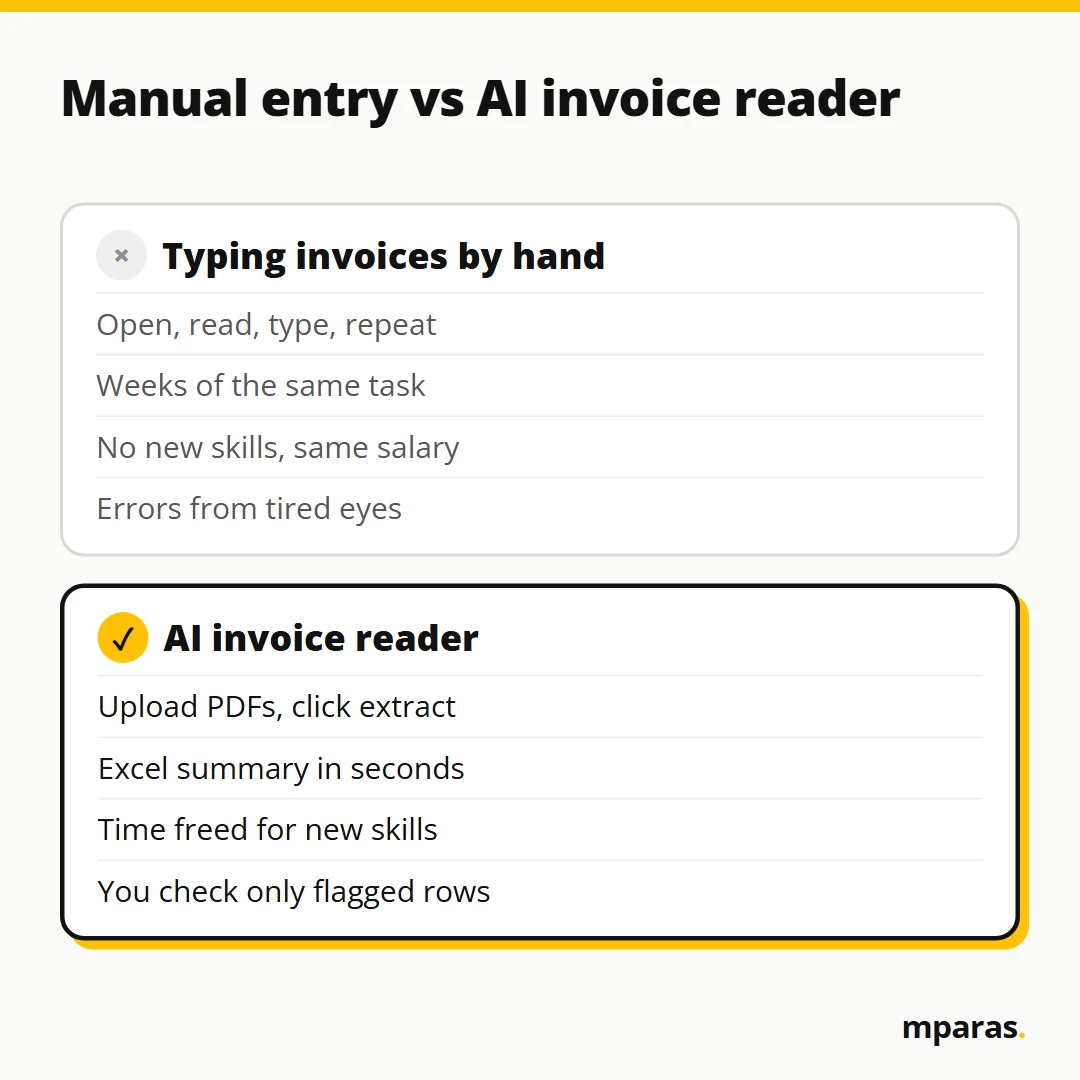
Let me tell you about Mr. Kant. He is an average finance professional. Every month, around 30,000 invoice PDFs come to him. Some are scanned copies, some are online copies. His job is to read each one and make a summary in Excel.
Think about it. Open an invoice, read it, type it, sometimes copy-paste, then the next one. This work took him 75 days. He did it with full dedication and believed he was working very hard. He was. But he was going round in a loop.
Why a loop? The process never changed, so his skills never grew. This is not surgery, where repetition makes you a great surgeon. It is redundant, boring work. Kaam toh kaam hai, but the company's budget for that job was Rs 50,000 a month. Year after year, the salary stayed the same. When told to improve, his answer was one I hear from many accountants: "I work ten hours a day. When do I improve?"
This is not a made-up story. It is a real-life situation, and many of us work exactly like this. So is there a solution?
What is invoice data extraction with AI?
Invoice data extraction means pulling the fields you need out of an invoice (invoice number, date, seller, buyer, GSTIN, taxable value, GST, grand total, line items) and putting them into rows and columns.
An AI invoice reader is a small application that does this for you. Mr. Kant's tool was very simple: select the invoice PDFs, upload, click extract, download the Excel summary. In my class demo, data from 200 invoices came into Excel within seconds. His 75-day job became a one-minute job.
Three words you will need. The front end is what you see: the screen and buttons. The back end is the logic behind it. OCR (optical character recognition) reads text from a scanned image. A PDF from billing software already has text inside; a scan is only a picture, so it needs OCR.
The real gain is not speed. Mr. Kant got 7 hours 59 minutes of his day back and put it into new skills. He did not just work faster. He transformed himself.
How to convert invoice PDF to Excel using AI: my 5-step method
When I show this tool to people, they say, "Sir, software engineers must have built this." No. Mr. Kant had no IT knowledge. He did a little research, understood how systems are built, and built it himself with AI tools. This is the method I teach.
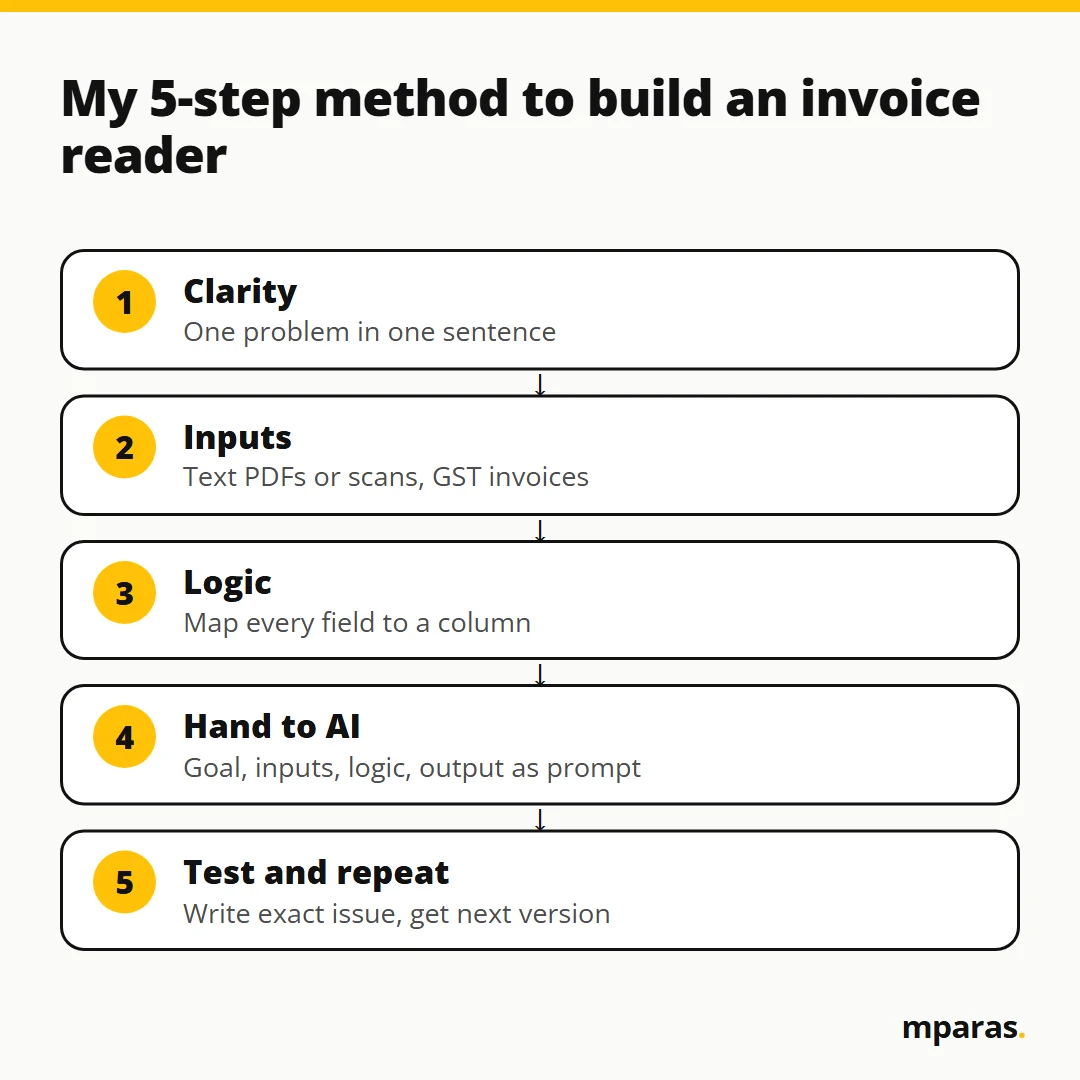
Step 1: Clarity. One problem, one sentence
AI will help you with everything, but it will not give you clarity. Write your problem in one sentence: "I have 3,000 invoices. I need them read into Excel." That's it. Don't say "build me an accounting system". One task at a time. Many tasks together means many processes together, and the system fails.
Step 2: Check your inputs
What do you actually have? Text-based PDFs or scanned copies? Indian GST invoices or foreign ones? Be clear, because AI cannot invent your data. It can only help with what you give it.
Step 3: Logic and field mapping
This is the most important step. Write exactly which field goes into which column. Invoice number in column A, invoice date in B, then seller name, seller GSTIN, buyer name, buyer GSTIN, taxable value, CGST, SGST, IGST and grand total. Need line items? Say "one row per line item". If you can't write the rule, AI can't guess it.
Step 4: Hand it over to AI
Mr. Kant wrote his requirement roughly and asked ChatGPT to turn it into a proper prompt. Then he gave that prompt to Emergent, an AI tool that builds a working application, front end and back end, from a text description. His rough request was this simple:
Please create a prompt for Emergent to read these invoices
and convert to Excel. I want just a simple tool, nothing
complex. Just upload PDF and convert to Excel.
One habit: read the prompt ChatGPT gives you and check it says what you meant.
Emergent then asked three questions. OCR for scanned files? No, text-based PDFs only. Indian GST invoices? Yes. Auto-download or a button? A simple download button. Then it built the whole thing in about 10 to 15 minutes and ran its own tests: "All tests pass."
Step 5: Test, fix, repeat
This is where most people stop, and exactly where I found the problems. I uploaded the invoices and checked invoice one, field by field. GSTIN: correct. Seller GSTIN: correct. Subtotal and IGST: correct. But the customer field was filled with "Maharashtra India". The seller name was wrong. The grand total was missing. And the line items were not picked up at all.
"All tests pass", and still half of it was wrong. Simple si baat hai: AI also makes mistakes. In Mr. Kant's final tool, the mapping was fully correct. Why? Because the field mapping was explained to the AI properly. So write the exact issue back: "Customer name is going into the wrong column. Grand total is missing. Read line items into separate rows." The AI gives you version two. Test again. Repeat the loop until the tool is right.
Keep real client data off chatbots
My golden rule: never paste real data. Build with dummy rows. Make two or three sample invoices with fake names, fake GSTINs and round numbers, and test on those. Your clients' invoices are confidential.
When data must stay private, I ask AI for a 100% offline, browser-based tool: one HTML file that runs in Chrome on my own computer, so the data never goes to the internet. Say this clearly in the prompt, or the AI may build something online. Climb to Google Sheets with script, or a full live app, only when the problem demands it.
Checks before you trust the extracted data
The logic is yours, so verify the output. I would not post a single entry until these checks pass:
- Totals tie: line items add up to the taxable value, and taxable value plus GST equals the grand total.
- GST = taxable value x rate: 10,000 at 18% must give 1,800.
- GSTIN is 15 characters: not 14, not 16.
- Right tax type: seller and buyer in the same state means CGST + SGST; different states means IGST. The first two digits of a GSTIN are the state code.
- No duplicates: the same invoice number from the same seller should appear only once.
Add check columns next to the extracted data. Suppose A is invoice number, B is taxable value, C is GST rate (formatted as %), D is GST amount, E is grand total and F is seller GSTIN:
GST check:    =IF(ABS(B2*C2-D2)<=1,"OK","CHECK")
Total check:  =IF(ABS(B2+D2-E2)<=1,"OK","CHECK")
GSTIN check:  =IF(LEN(TRIM(F2))=15,"OK","CHECK")
Duplicate:    =IF(COUNTIFS(A:A,A2,F:F,F2)>1,"DUPLICATE","")
The <=1 allows one rupee for rounding. Example: taxable value 5,000 at 18%, extracted GST 90. It should be 900, so the row shows CHECK. The tool probably dropped a zero. Go back to that PDF.
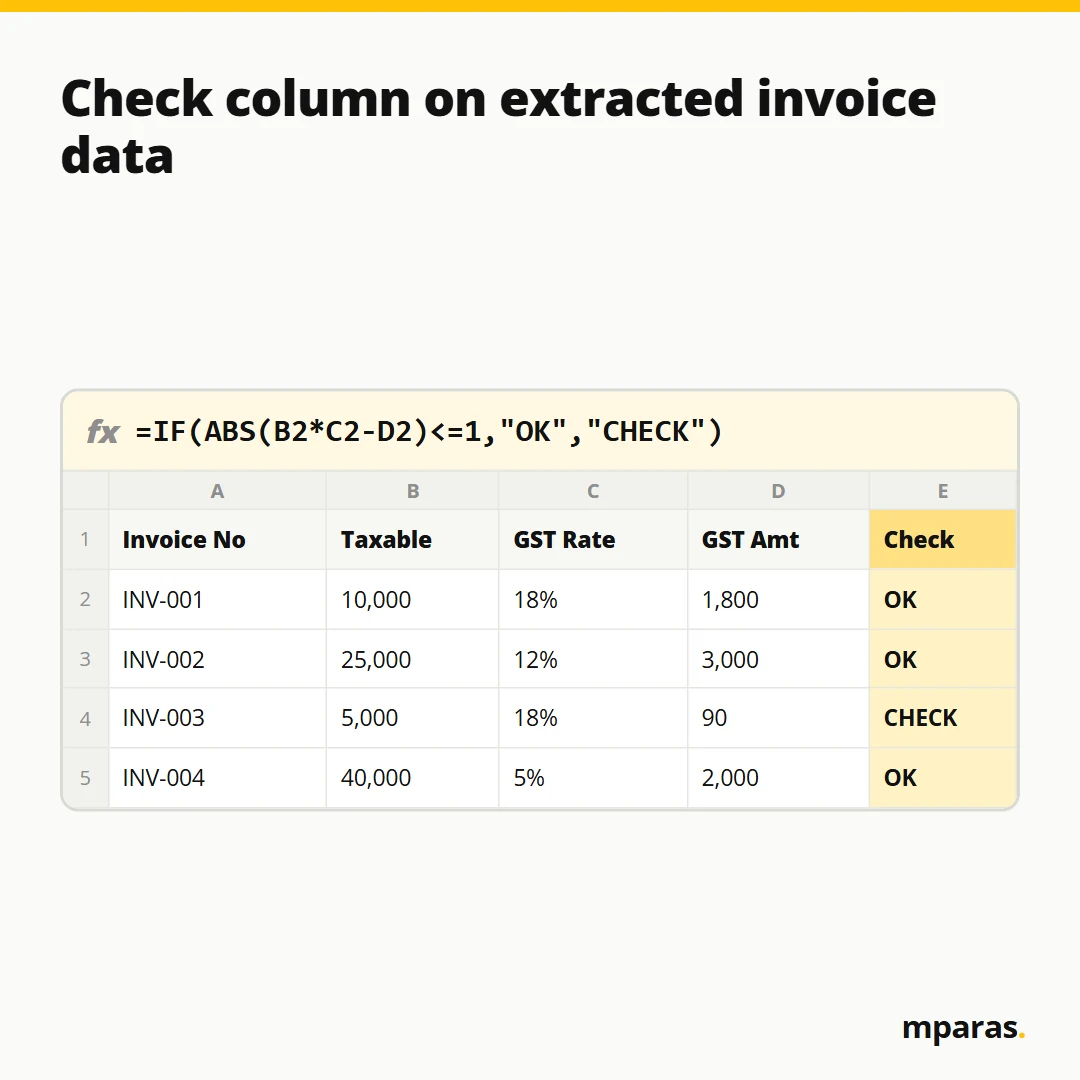
Filter on "CHECK" and look only at those invoices. You don't read 30,000 invoices again. You read the few that failed, say, 40.
Common mistakes when you automate invoice entry
- Trusting "All tests pass". The tool's own test is not your test.
- Asking for too much in version one. One problem, one tool. Add features one by one, as version two, version three.
- Vague logic. "Read the invoice" is not a logic. Give the field-to-column mapping.
- Not telling the AI about scans. Scanned copies need OCR. Say so upfront.
- Depending fully on AI. If you don't know whether the problem is in the front end or the back end, AI will fix one error and create another.
FAQs
Can AI convert scanned invoice PDFs to Excel?
Yes, but scanned copies need OCR, because a scan is only an image. Tell the AI at the start which kind you have; in my demo I kept version one to text-based PDFs.
Do I need to know coding to build an invoice reader?
No. You need to know your inputs, your output and the logic in between. AI writes the code; your job is clarity. A basic idea of front end and back end helps you tell the AI exactly what to fix.
Is it safe to upload client invoices to ChatGPT?
I never give real confidential data to AI. Build and test with dummy invoices, and for real data ask for a 100% offline browser-based tool, so the data stays on your system.
How accurate is AI invoice data extraction?
It depends on your field mapping and testing. In my first build, the GSTINs and IGST were right but the customer name and grand total were wrong. Accuracy comes from the test-and-fix loop and your check columns.
Which tool should I use: ChatGPT, Claude or Emergent?
Any of them can work. I used ChatGPT to refine the prompt and Emergent to build a live app, and I use Claude or ChatGPT for offline browser tools. Choose based on the problem.
Related reading: ChatGPT for Accountants: How It Works and How to Use It Safely and What Is an API? A Simple Explanation for Finance Professionals.
Start with three dummy invoices, not 30,000
The free fix for today: make three dummy invoices, write your one-sentence problem and column mapping, and put the check formulas next to whatever output you get. Not sure where you stand with AI? Take this free 2-minute AI test.
If you want the full path, from the 5-step method to building tools with ChatGPT, Claude and Emergent, offline browser tools, Google Sheets with script and testing every output, I teach it in the AI in Finance course. Remember: you are not here to do more work. You are here to think, design and automate.
Stop doing finance work by hand.
Build your own AI tools for collections, invoices and reports. No coding. In Hinglish, taught by a CA.
- 27 chapters, 15+ real tools
- Lifetime access, GST invoice
₹2,499 GST included
Buy the course See what's inside or take the free 2-minute AI test
Comments
No comments yet. Ask a question or share how you'd use this.