
ChatGPT for Accountants: How It Works and How to Use It Safely
ChatGPT for accountants: it predicts text, so it can be confidently wrong. Write a clear master prompt, check every number, and never paste real client data.
Be honest with me. When you get stuck at work today, where do you go first? Most people open ChatGPT and ask. That is not wrong. But I see people doubting their own judgement and trusting AI more. So in this guide on ChatGPT for accountants, I will explain three things simply: how it actually works, how to instruct it so you get the right result, and how to use it without putting client data at risk.
In my class I show a short video. Four people are doing one job. A machine comes in and only one is left, the one who knows how to run the machine. The other three? Out. AI has the same blunt message: you won't lose your job to AI, you will lose it to someone using AI.
What is ChatGPT, and how does ChatGPT work?
If I ask you "What is your name?", you reply with your name. Why didn't you tell me your age? Because your mind predicted, from what it has learned, that a name is the right answer.
ChatGPT works the same way. It is a large language model (LLM), which simply means a program trained on a huge amount of text. It studies that data and learns patterns. When you ask "What is your name?", it checks what answer appeared most often for that kind of question, and gives you that.
Think of two children, one born in the UK and one in India. By age 10, one speaks very good English and the other very good Hindi. Nobody is born with fixed thinking; our surroundings shape us. AI is similar. No fixed rules, it learns from data. Good data, good decision.
But how does a computer understand English?
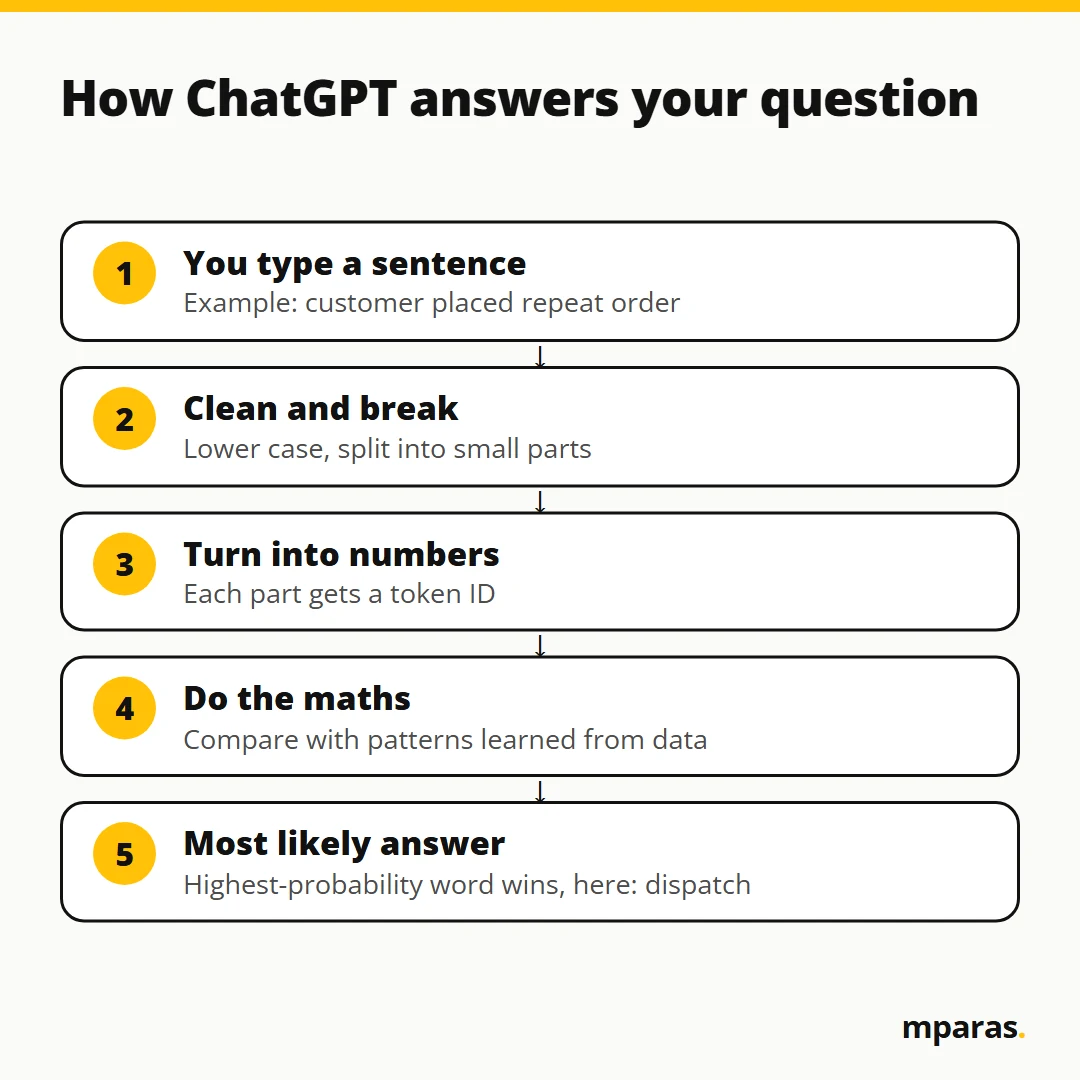
It doesn't, not the way we do. Let me show you with a small demo I use in class. Say I type "customer placed repeat order".
- Clean it: it corrects the text and puts it in lower case.
- Break it: it splits the sentence into small parts.
- Number it: each part gets a number, called a token ID. Your sentence is now maths.
- Calculate: it compares these numbers with patterns from everything it has learned.
- Answer: it picks the word with the highest probability. In my demo, it said "dispatch".
When I typed "order dispatch", the data had "today" once and "tomorrow" once. For the machine it was 50-50, so it guessed. AI is not magic. It is a guess, probability and maths.
Why ChatGPT can be confidently wrong
Remember this line: it predicts, it does not truly understand.
Take an illustration. Suppose you ask it the GST rate on an item. It gives the answer that looks most likely from what it learned. That may be an old rate, or the rate for a similar item. And it says it in the same confident tone as a correct answer, because it is not checking a notification. It is predicting text.
So never lose your judgement. Use AI to make your judgement superior, but the final decision should be yours. When I built a ratio analysis tool with ChatGPT in class, it showed a current ratio of 1.58. I went to the balance sheet, divided total current assets by total current liabilities, and checked. 1.58. Only then did I trust it. People think "AI ne kiya hai, toh theek hi hoga". Never. Always test before using anything in the real world.
Prompts for accountants: the master prompt method
A prompt is simply the instruction you type into ChatGPT. Earlier, to automate anything you needed to know a lot of code. Today, a clear thought and well-defined steps are your code. AI will help you with everything, but it will not give you clarity. You have to know what you want.
I use five steps. The first four together make what I call a master prompt:
- Goal (clarity): one problem, one sentence. Not "build me an accounting system". Too big.
- Input: which file, and which columns to read. AI cannot invent your data.
- Logic: the exact rule, step by step. If you can't write the rule, AI can't guess it.
- Output: what you want back: a file, a table, a dashboard, email drafts.
- Test: check the result. If something is wrong, write the exact issue to the AI and repeat until it is right.
Example: bad prompt vs good prompt
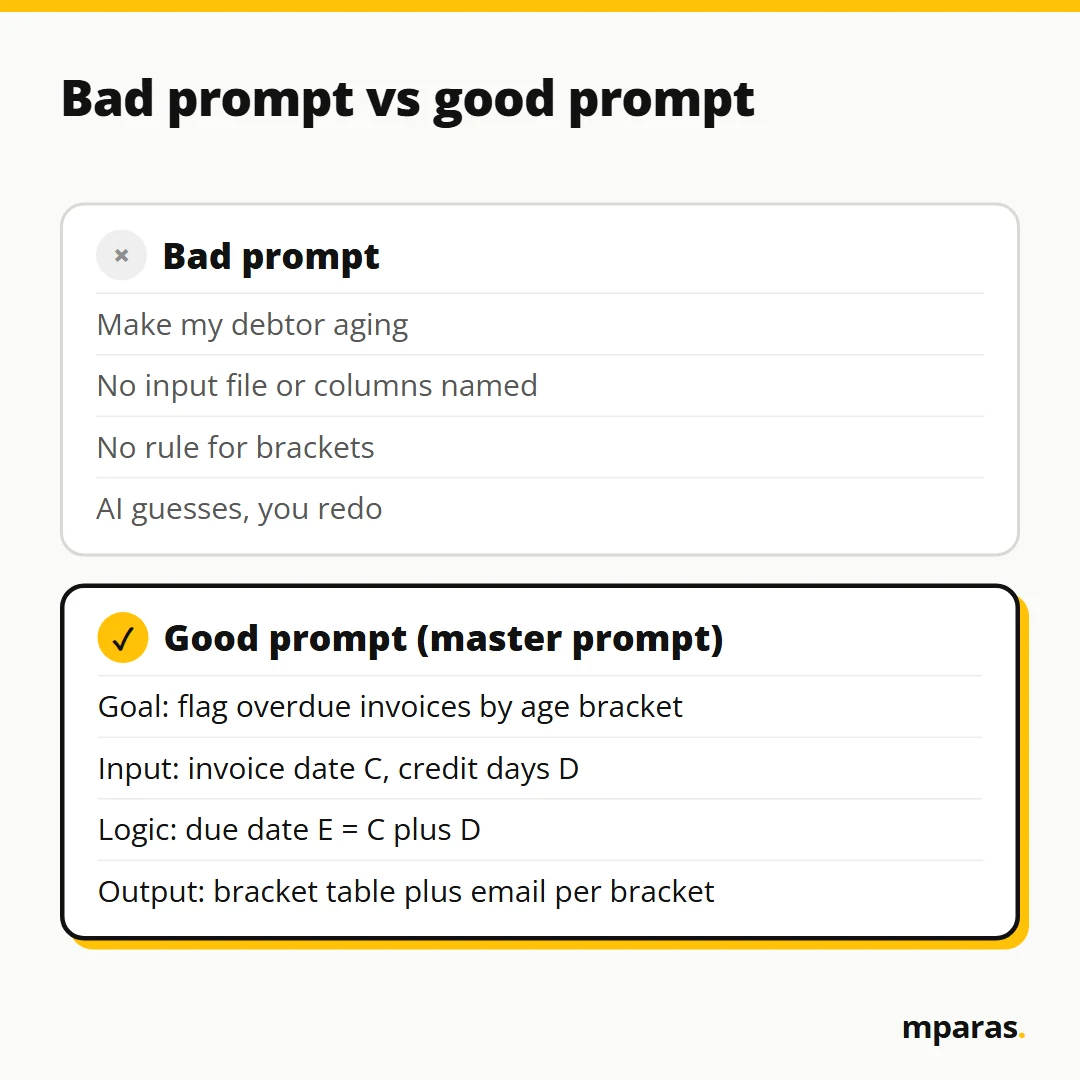
Bad prompt:
Make my debtor aging.
"Debtor aging" is a very wide word. AI will do it its own way, which you may not like. Here is how I would write it:
Goal: Show overdue invoices by bracket and draft
a different reminder email for each bracket.

Input: Excel file (dummy copy). Column C = invoice date,
column D = credit days.

Logic:
1. Column E = due date: read C, add the days in D.
   (10 April + 30 days = 10 May.)
2. Days overdue = today minus due date.
3. Brackets: up to 30, 31-60, 61-90, 91-120, above 120.

Output: Table with bracket per invoice, plus one email
draft per bracket. 100% offline, Chrome-based tool.
See how precise that is? In Excel terms, column E is just =C2+D2 and days overdue is =TODAY()-E2. You already know this logic. You just have to write it down.
AI in accounting: what to actually use it for
Most of us use ChatGPT for emails, documents and questions. That helps. But the bigger shift is that you can now build small apps with it. I call them micro applications: small, focused tools for one specific business problem.
A real example. A client was at month-end closing, the last day of the month, and their dashboard stopped because the vendor suspended it over a pending payment. No view of total sales or open orders. At 5 pm I spent 30 minutes understanding what they needed, wrote down the input, steps and output, and got a simple HTML file made. They uploaded their data and could see which state had achieved its turnover target, then spoke to the ABMs and RBMs of the states that were short.
A finance team can build tools for invoice tracking, approvals, reconciliation, reporting, or ratio analysis from the balance sheet, P&L and cash flow. I run one that reads my inbox: around a thousand emails a day, maybe ten matter, and one click shows me those ten.
Who knows your GST or reconciliation problem better, you or a developer? You. That domain knowledge is now the scarce input. My challenge: if a repetitive job takes 10 hours, target 30 minutes. Even two hours frees most of your day.
One caution. Don't use AI just because everyone is talking about it. There is an old saying, jo kaam sui kar sakti hai, woh talwar nahi kar sakti. Use AI where it gives real benefit. Spending ₹10 to get ₹1 of benefit is useless.
Is it safe to use ChatGPT with client data?
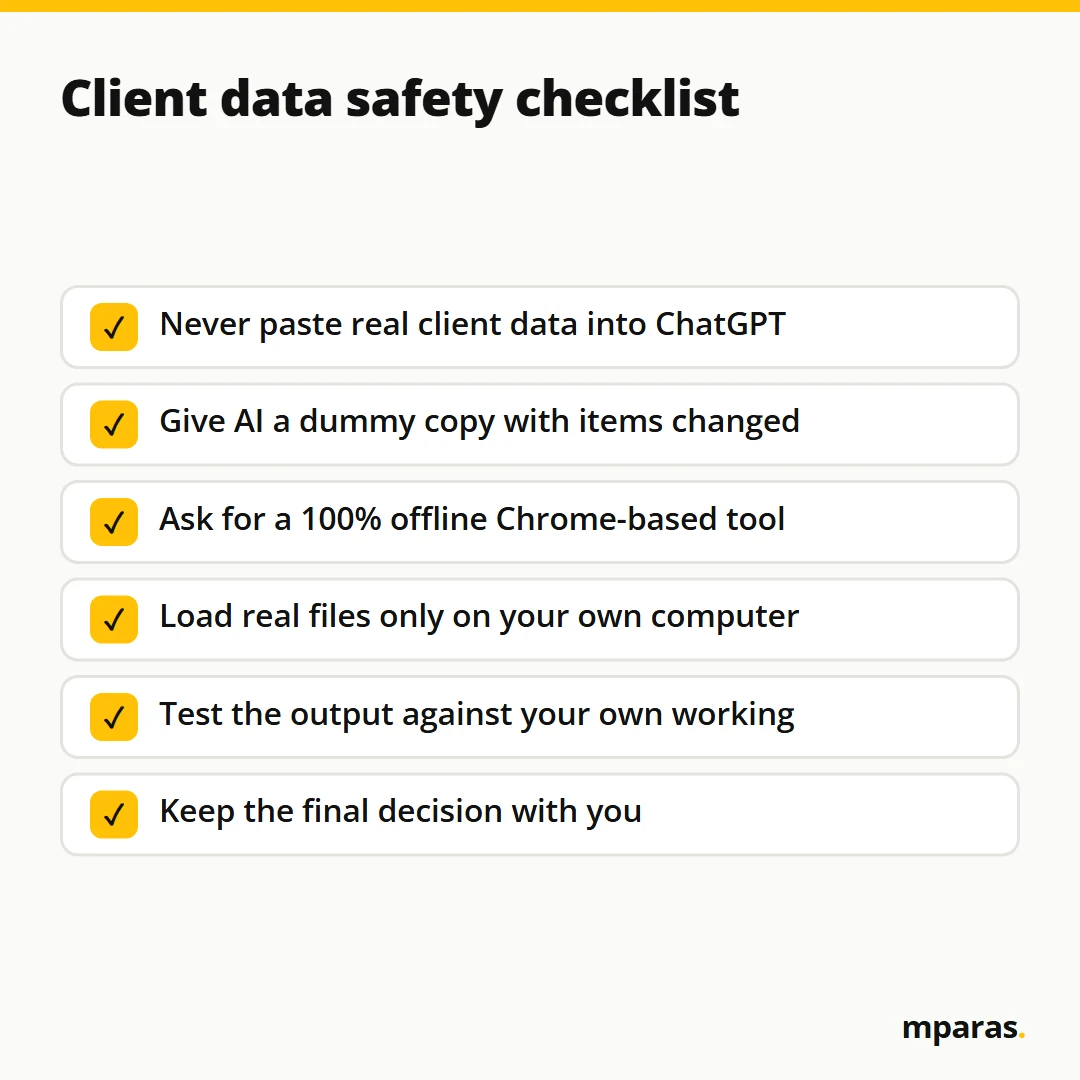
My rule: never put your real data on ChatGPT or Claude directly. Many people are making this mistake. Everything sells on the dark web, and one day you hear the data is out. Don't expose client data, payroll, ledgers or financials. So how do you get the benefit without the risk?
- Use dummy data. I make a copy of the file, remove or change items, and give the AI only that copy.
- Ask for a 100% offline tool. A Chrome-based HTML file is just a web page saved on your computer. The browser opens it without internet, so your real file stays on your system.
- Go bigger only when needed. Need history or a database? A local website runs on your own computer. Climb a step only when the one below runs out.
- Use it ethically. The same power that helps you also helps scammers.
ChatGPT for accountants: common mistakes to avoid
- Trusting answers without checking, especially rates, sections and due dates.
- Pasting real client files into the chat window.
- Wide prompts like "do my reconciliation" with no input, logic or output.
- Growing a small tool until it becomes a mess. AI makes mistakes, and the more complex it gets, the more it breaks.
- Not understanding the logic. The logic is yours. AI only writes the code.
FAQs
Can ChatGPT give wrong tax rates or GST answers?
Yes. It predicts the most likely answer from patterns in its data, so an old or wrong rate can sound fully confident. Always check rates and sections against the official source.
Is it safe to use ChatGPT with client data?
Not directly. Don't paste real client data into ChatGPT or Claude. Work with a dummy copy, and ask the AI to build a 100% offline tool so real data never leaves your computer.
Will ChatGPT replace accountants?
AI will not take your job, but someone using AI might. Your accounting knowledge becomes more valuable, because you know exactly what the tool should do.
What are good prompts for accountants?
A good prompt gives the goal in one sentence, names the input file and columns, writes the logic step by step, and describes the output. Then you test and fix with the AI until it is right.
Do I need to learn coding to use AI in accounting?
No. AI writes the code. You need clarity about your process and enough understanding to test whether the output is correct.
Related reading: Convert Invoice PDF to Excel with AI (Without Typing) and Automatic Payment Reminder Email from Google Sheets: Full Guide.
Where to start
Pick one repetitive task from this week and write it as goal, input, logic and output on paper. If you can't write it clearly, that is the real gap, not the AI. See where you stand with this free 2-minute AI test.
To go further, my AI in Finance course walks you through how AI works, the master prompt method, and building offline tools step by step with dummy data, so client data stays where it belongs.
Stop doing finance work by hand.
Build your own AI tools for collections, invoices and reports. No coding. In Hinglish, taught by a CA.
- 27 chapters, 15+ real tools
- Lifetime access, GST invoice
₹2,499 GST included
Buy the course See what's inside or take the free 2-minute AI test
Comments
No comments yet. Ask a question or share how you'd use this.