
Nested IF Formula in Excel: IF, AND, OR for Accountants
A nested IF formula in Excel puts one IF inside another, so Excel checks conditions in order and stops at the first true one. Use AND when all must be true, OR when any one is enough.
Every morning my accounts team does one job: pull the customer list from SAP, flag anyone overdue by more than 30 days, and send a reminder. By hand, every day. But this job is a rule, and a rule can be written once. In this article I will show you how to write that rule with the IF function, then with AND and OR, and finally with a nested IF formula in Excel that handles 30, 60 and 90 day ageing in one cell.
First find the logic, then write the formula
Water turns to steam at 100 degrees. Not at 80. Boil it ten thousand times and the result will not change, because the logic is right. Work is the same.
So before any formula, ask why. Why 30 days? It is not a random number. A company runs on working capital, the day-to-day money needed to keep the business going, and that money usually comes from a bank loan. Every extra day a debtor does not pay is an extra day of interest for me. In one business my working capital cycle was about 150 days: customers took 80 to 90 days against 30 days credit, and inventory sat for about 60 days. I wanted it at 75. The biggest cut was sitting in debtors. That is why the 30-day follow-up task exists.
Once you know the why, you can write the rule clearly: if overdue days are more than 30, follow up, else leave it. Now Excel can do it.
What is the IF function in Excel?
IF checks one condition and gives one answer if it is true and another if it is false. The structure is:
=IF(logical_test, value_if_true, value_if_false)
Chalo, Excel kholte hain. Say column C has overdue days. In the next column type:
=IF(C2>30,"Follow up","Leave")
If C2 is 35, you get Follow up. If C2 is 23, you get Leave. Drag it down and the whole list is flagged. Note the inverted commas: whenever the answer is text, it must sit inside double quotes.
You already use this rule on every GST invoice: same billing state and place of supply means CGST and SGST, else IGST. In Excel: =IF(B2=C2,"CGST + SGST","IGST"). Your accounting software runs the same kind of IF behind the screen.
IF AND OR formula in Excel: two conditions in one test
Real life is rarely one condition. In class I gave this exercise: follow up only if the customer is overdue by more than 30 days and the amount due is more than Rs 10,000. If either condition fails, leave it. Chasing a customer for Rs 400 makes no sense. Chasing for Rs 1 crore does.
I had not taught AND yet. On purpose. In the real world nobody tests your memory; they test your ability to get things done. So I went to Google and typed "how to put two conditions in IF statement in Excel". The answer: put an AND function inside the logical test. Ratna nahi hai, samajhna hai.
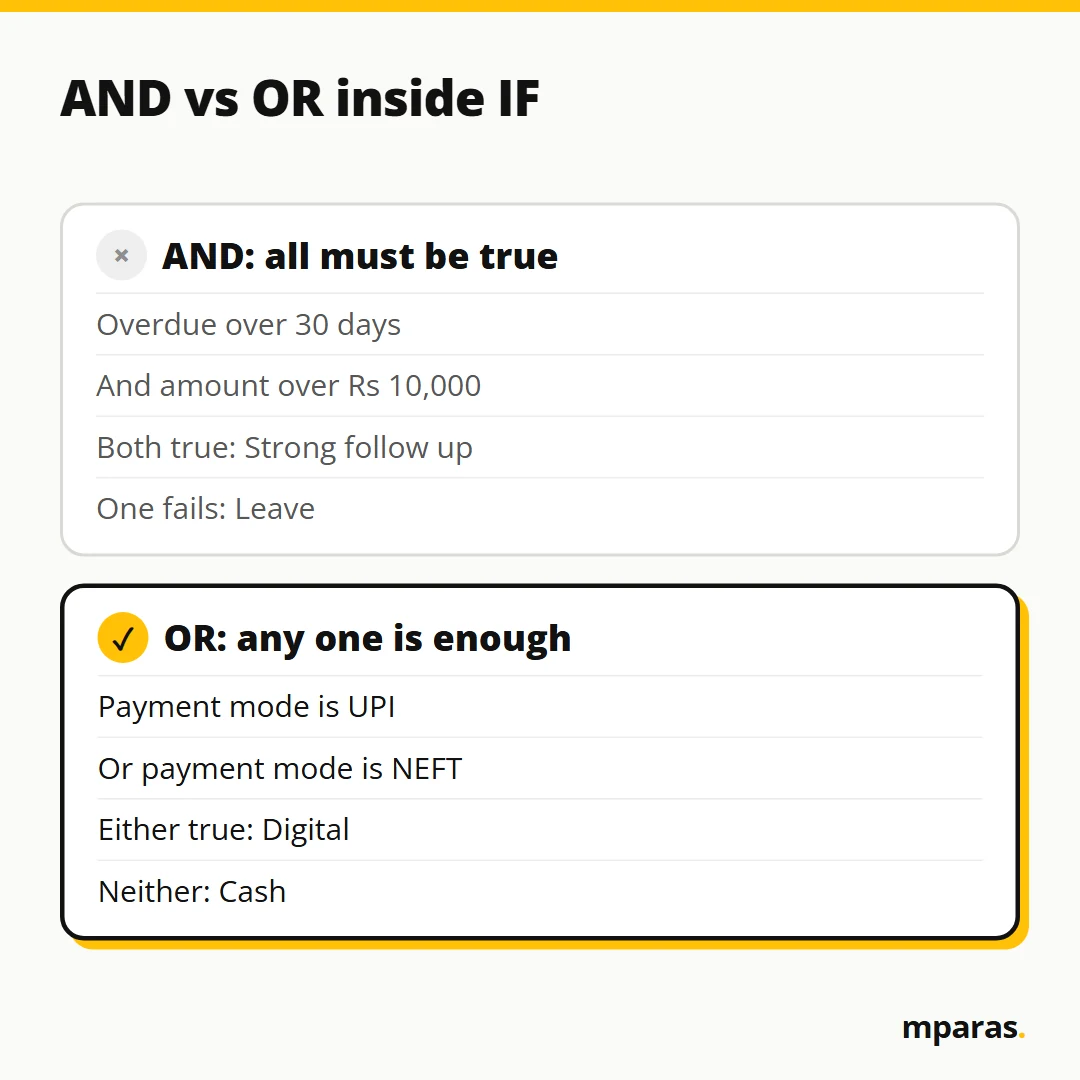
AND: every condition must be true
=IF(AND(C2>30,D2>10000),"Strong follow up","Leave")
ABC Ltd at 35 days and Rs 50,500 passes both tests, so it shows Strong follow up. Priya at 23 days and Rs 45,000 has a big amount but is not overdue enough, so it shows Leave.
OR: any one condition is enough
Next exercise. I added a Payment mode column with three options: Cash, UPI and NEFT. If it is UPI or NEFT, the result should say Digital, else Cash. I first wrote it with AND:
=IF(AND(E2="UPI",E2="NEFT"),"Digital","Cash")
The cell said UPI and the result said Cash. Why? AND wants both conditions true, and one cell cannot be UPI and NEFT at the same time. So it is always false. What I needed was OR:
=IF(OR(E2="UPI",E2="NEFT"),"Digital","Cash")
Now UPI and NEFT give Digital and Cash gives Cash. Remember it this way: all conditions, use AND; any one condition, use OR.
How to write a nested IF formula in Excel
Collections do not stop at follow up or leave. There are layers:
- 30 days or less: Ignore
- More than 30, up to 60: Follow up
- More than 60, up to 90: Strong follow up
- More than 90: Legal action
So far the false part of IF held a fixed value. But you can put another IF there: if the first test fails, check the next one. That is a nested IF, an IF inside an IF. I also call it layered rules.
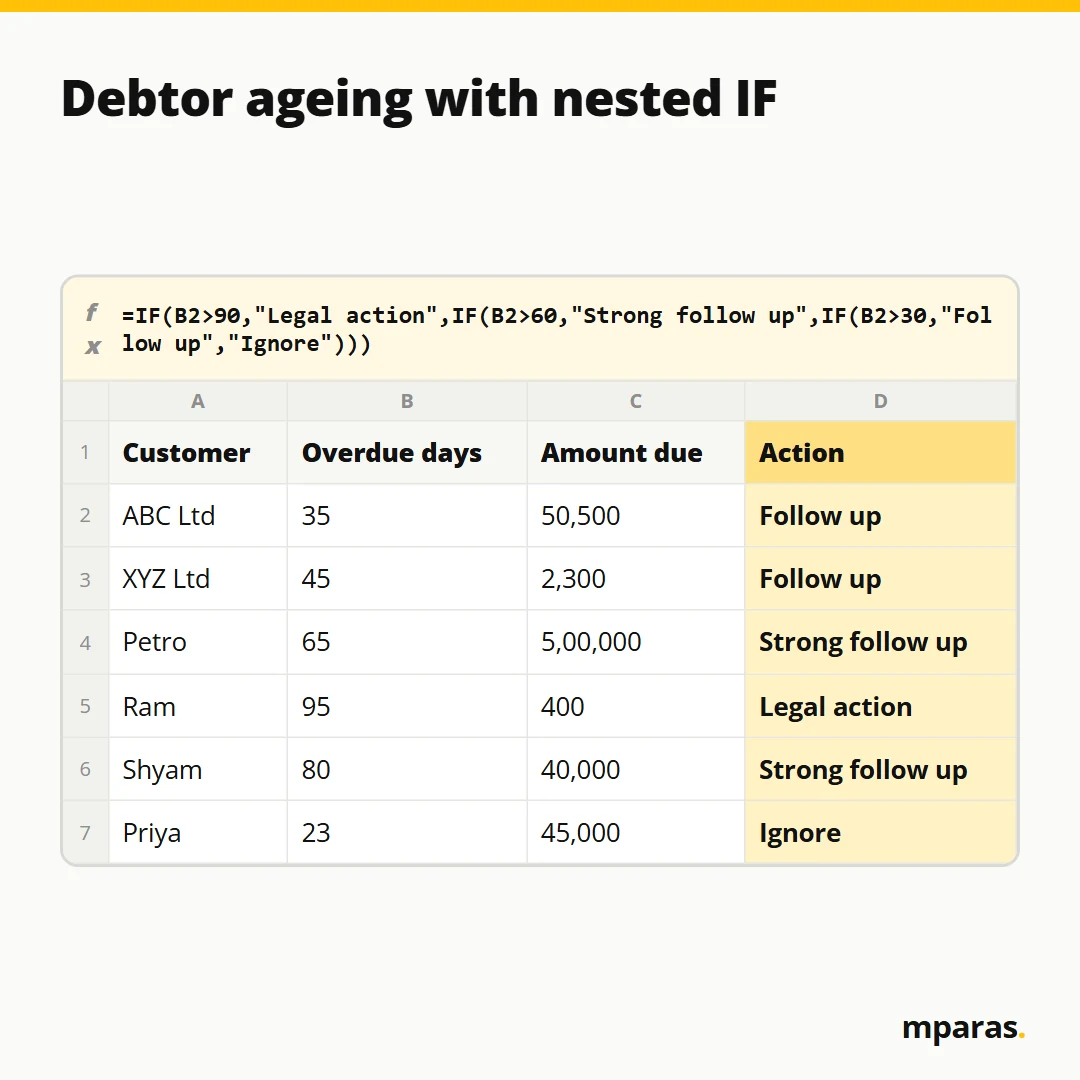
=IF(C2>90,"Legal action",IF(C2>60,"Strong follow up",IF(C2>30,"Follow up","Ignore")))
Let me show you how to read it. More than 90? Legal action. If not, more than 60? Strong follow up. If not, more than 30? Follow up. Nothing left? Ignore. Three IFs, so three closing brackets. Keep closing brackets until the last one turns black; Excel colours each pair so you can match them.
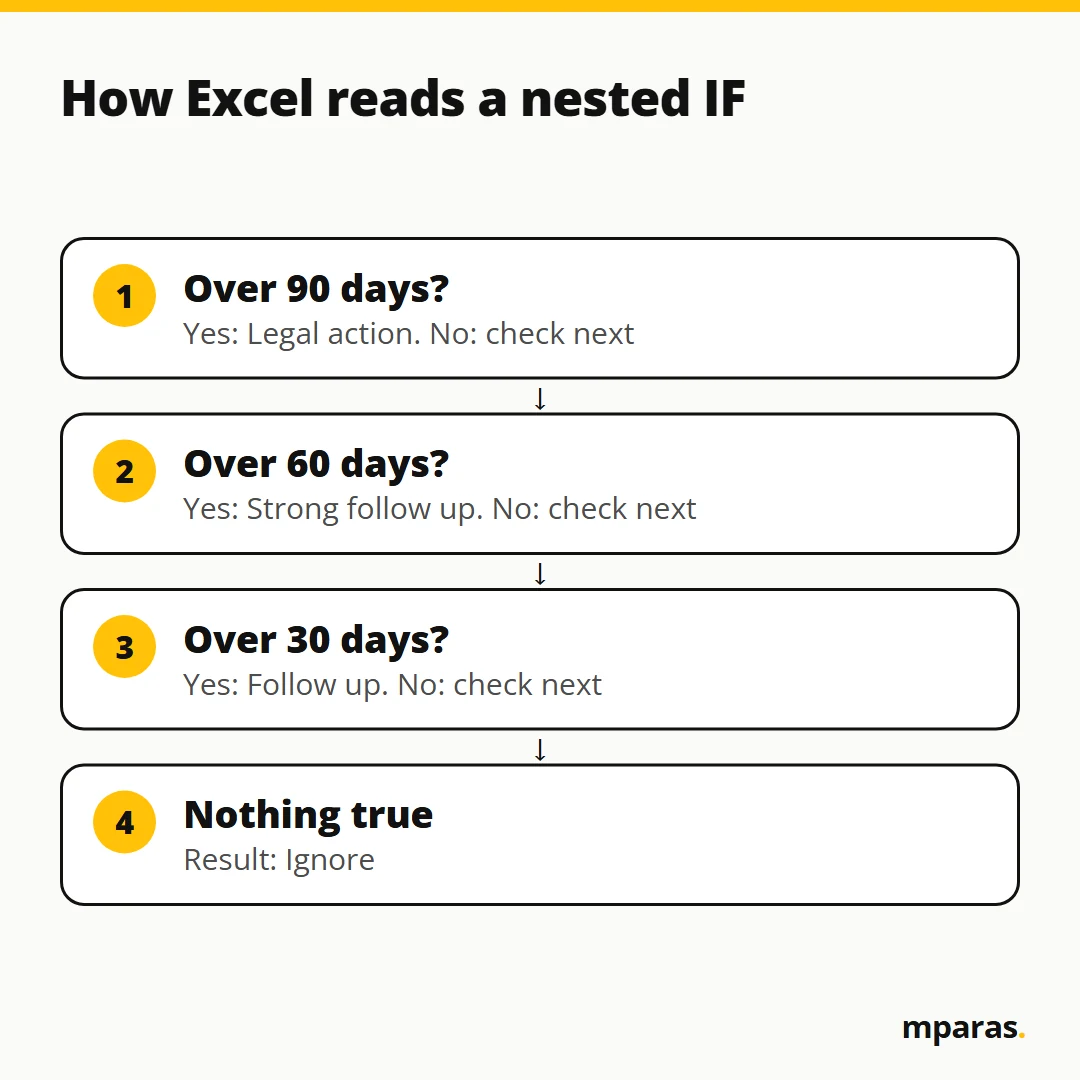
Excel reads a nested IF left to right and stops at the first true condition. It never goes backwards. That is why the order matters. Start with the biggest bucket and come down.
Example: one debtor sheet, three formulas
Here is a small sheet with the customer names from my class.
| Customer | Overdue days (C) | Amount due (D) | AND rule | Nested IF ageing |
|---|---|---|---|---|
| ABC Ltd | 35 | 50,500 | Strong follow up | Follow up |
| XYZ Ltd | 45 | 2,300 | Leave | Follow up |
| Petro | 65 | 5,00,000 | Strong follow up | Strong follow up |
| Ram | 95 | 400 | Leave | Legal action |
| Shyam | 80 | 40,000 | Strong follow up | Strong follow up |
| Priya | 23 | 45,000 | Leave | Ignore |
AND rule: =IF(AND(C2>30,D2>10000),"Strong follow up","Leave"). Nested IF: =IF(C2>90,"Legal action",IF(C2>60,"Strong follow up",IF(C2>30,"Follow up","Ignore"))). Look at Ram: ageing says Legal action, but the AND rule says Leave because Rs 400 is below 10,000. Two rules, two questions.
Excel IF formula with multiple conditions: a credit-hold illustration
If reminders fail, the next step is stopping supplies. Say column F holds each customer's credit limit:
=IF(OR(D2>F2,C2>90),"Hold supplies","Release")
Say Petro owes Rs 5,00,000 against a limit of Rs 3,00,000: Hold supplies. Ram owes only Rs 400 but is 95 days overdue: Hold supplies. ABC Ltd owes Rs 50,500 against Rs 1,00,000 at 35 days: Release. These limits are only an illustration.
IFS function: a cleaner way to write nested IF
If you have Excel 2019, Excel 2021 or Microsoft 365, or you work in Google Sheets, you can write the same ageing rule with IFS. It takes pairs of condition and result, so there are no brackets inside brackets:
=IFS(C2>90,"Legal action",C2>60,"Strong follow up",C2>30,"Follow up",TRUE,"Ignore")
IFS has no else part. The last pair TRUE,"Ignore" works as the catch-all. Without it, a 23-day customer gives an #N/A error. IFS also checks left to right, so the same ordering rule applies. On Excel 2016 or older, IFS shows #NAME?, so stick to nested IF there.
Common mistakes with nested IF, AND and OR
- Using AND when you mean OR. My payment mode mistake. If one cell must match any of several values, it is OR.
- Wrong order in nested IF. In class I changed the first test to
C2>30with the answer Legal action. Result: a 35-day customer went to legal. Excel found the first true condition and never checked the rest. - Missing quotes or brackets. Text answers need double quotes. Every IF( needs its own closing bracket.
- Deleting the column the formula depends on. I moved the overdue days column and deleted the old one, and the logic broke. Excel automation works only while the cells it points to stay where they are.
- Messy input. If someone types "UPI " with an extra space or "Upi payment", the OR test fails. Put a dropdown on the column: Data, Data Validation, List, and give the source list. Right data gives right decisions.
- Forgetting the boundary. With
C2>30, exactly 30 days is Ignore. If your policy says 30 days is overdue, useC2>=30.
Why this matters beyond Excel
Business has dozens of decisions and exceptions. It looks like rocket science until you break it into rules: if, and, or, nested. Once a rule is clear, Excel or AI can run it for you. But the brain must stay yours; you cannot hand AI a rule you do not understand. When the logic is yours and the running is automated, a two-hour daily task becomes a two-minute rule.
FAQs
What is a nested IF formula in Excel?
It is an IF function placed inside another IF, usually in the false part. Excel checks the first condition, and only if it fails moves to the next. It is used for layered rules like ageing buckets or slab-wise decisions.
How many IFs can I nest in Excel?
Modern Excel allows up to 64 nested IFs. But beyond four or five the formula becomes hard to check, so use IFS or a lookup table instead.
When should I use AND and when OR inside IF?
Use AND when every condition must be true, like overdue more than 30 days and amount more than Rs 10,000. Use OR when any one condition is enough, like payment mode UPI or NEFT. If one cell must match one of many values, it is almost always OR.
Is IFS better than nested IF?
IFS is easier to read because there is no stack of brackets. But it needs Excel 2019 or later and has no else part, so end it with TRUE and a default result.
Why does my nested IF give the wrong result?
Usually the order is wrong. Excel stops at the first true condition, so put the biggest bucket first with greater-than tests. Also check for extra spaces in text cells.
Related reading: Automatic Payment Reminder Email from Google Sheets: Full Guide and Convert Invoice PDF to Excel with AI (Without Typing).
Start with the rule, then automate it
Here is the free fix: take one task you do daily, ask why it exists, write the rule in plain words, then turn it into one IF formula. If you want to know where you stand with AI tools today, take the free 2-minute AI test. And if your debtor follow-up still eats an hour every morning, the AI in Finance course takes this same logic further: we build a customer collection project on Google Sheets with Apps Script that sends the reminders for you.
Stop doing finance work by hand.
Build your own AI tools for collections, invoices and reports. No coding. In Hinglish, taught by a CA.
- 27 chapters, 15+ real tools
- Lifetime access, GST invoice
₹2,499 GST included
Buy the course See what's inside or take the free 2-minute AI test
Comments
No comments yet. Ask a question or share how you'd use this.